

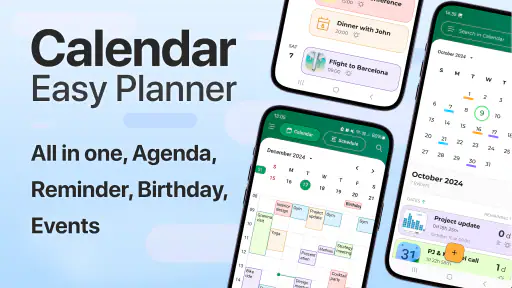
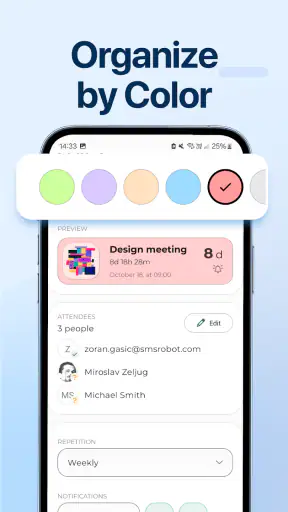
I like calendars that stay out of the way. A planning app should help me see what is coming, remember the things I might otherwise miss, and arrange a busy day without turning scheduling into another project. Calendar - Easy Planner is built around that straightforward idea, and after using it, I see why it has attracted a large audience. It is a free productivity app from Glad Appvestor, aimed at people who want a simple place to plan, schedule, and set reminders rather than a complicated system for managing every part of life.
My overall view is positive, with one important qualification: this is most appealing when you want a clean, approachable calendar experience. If you need deep collaboration, elaborate project planning, or a highly customized work system, a more advanced alternative will probably suit you better. For personal appointments, study blocks, household tasks, recurring routines, and everyday reminders, however, its uncomplicated approach is a genuine strength.
What makes the everyday planning experience work
The first thing I noticed is that the app’s purpose is easy to understand. I do not have to learn a new productivity philosophy before adding something to my schedule. I can think in ordinary terms: an appointment, a task, a reminder, or a block of time that needs protecting. That makes it useful for someone who has tried more elaborate calendar tools and found them distracting, as well as for anyone setting up a digital planner for the first time.
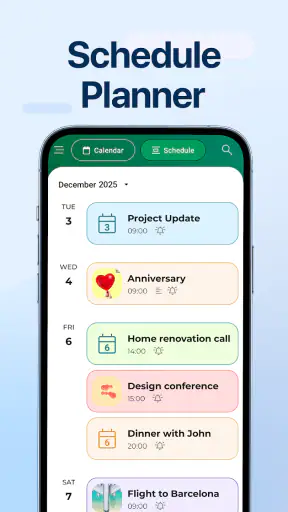
Its place in the productivity category is clear. Rather than trying to replace a complete task-management suite, it focuses on the calendar as the central view of the day. That distinction matters. Many task apps leave me with a long list and no realistic sense of when anything will happen. A calendar-first approach encourages me to put obligations into time, notice clashes, and see whether a supposedly “free” day is actually full.
I found that especially useful for planning around fixed commitments. If I have a meeting, a class, a medical visit, or a family responsibility, I can treat that item as an anchor and arrange flexible work around it. This is a more practical habit than simply collecting tasks in an endless list. The app’s simple presentation supports that way of thinking without making me feel as though I am managing a miniature business operation.
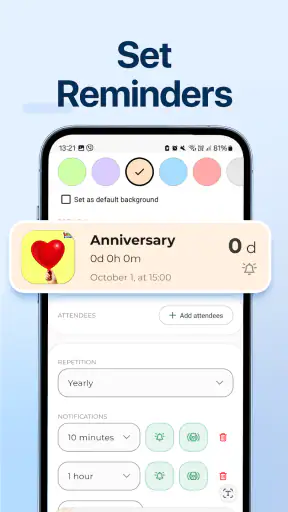
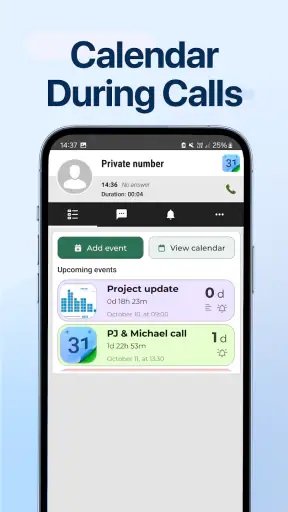
The reminder focus is another meaningful advantage. A calendar entry is helpful only if I notice it at the right moment. When I use a reminder-oriented workflow, I am less likely to rely on memory for small but important matters such as calling someone, preparing documents, or leaving home on time. The difference is subtle: the app is not just a record of what I planned, but a prompt to return to that plan.
A realistic example is a busy weekday with a morning appointment, a work deadline, grocery shopping, and an evening commitment. I would first place the fixed events into the day, then add the deadline as a scheduled work period instead of leaving it as a vague task. Shopping can sit in a practical gap, while the evening event remains visible as a hard boundary. Looking at the whole day this way helps me spot the real problem: not forgetting an item, but overestimating how much time is available.
That is one of the app’s less obvious benefits. A basic calendar can become a lightweight decision tool. When I move an item and see what it displaces, I am forced to choose between commitments instead of pretending everything fits. This is particularly helpful for students, parents, freelancers, and people who divide their time between work and personal responsibilities.
The app is also approachable for users who do not want to maintain a complicated tagging or filing system. I can start with a few essential entries and build a habit before deciding whether I need more structure. That low entry barrier is important because many planning tools fail not because they lack capability, but because opening them feels like work.
At the same time, I would not mistake simplicity for a complete productivity method. The app can help me decide when something should happen, but it cannot automatically solve poor prioritization. If I fill every open space with tasks, the calendar may look organized while remaining unrealistic. My best results came from leaving breathing room between demanding activities and using reminders for genuinely important prompts rather than every minor action.
A practical workflow for appointments, tasks, and reminders
My preferred way to use Calendar - Easy Planner is to separate fixed events from flexible work in my own thinking, even when both live in the same planning environment. Fixed events get protected first. Flexible tasks are then placed around them according to urgency and energy. This simple order prevents a common mistake: scheduling low-value activities early and discovering later that the important work has nowhere to go.
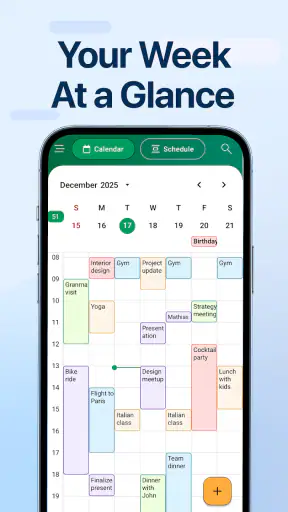
For recurring responsibilities, I would review the calendar at the start of the week rather than adding items only when they become urgent. A weekly glance gives me a chance to notice crowded days, prepare for upcoming obligations, and move nonessential work before it becomes a last-minute problem. The app is well suited to this routine because its purpose is immediately visible; I am not forced to translate a separate task list into a schedule every time.
A useful trick is to treat reminders differently according to consequence. I would use an earlier prompt for something that requires preparation, such as gathering papers or charging a device, and a closer prompt for something that only needs a quick action. This keeps notifications meaningful. If every entry produces the same level of urgency, I eventually stop paying attention.
I also recommend using short, recognizable wording in event names. A phrase that tells me exactly what I need to do is more useful than a vague label. “Prepare presentation notes” gives me direction; “presentation” merely tells me that a topic exists. That kind of discipline is not a feature claim about the app, but it makes a simple planner much more effective in daily use.
Another non-obvious use is planning recovery time. People often schedule appointments and work while ignoring the transition between them. I get a more honest day when I allow time for travel, setup, meals, or simply changing mental gears. A calendar that shows only formal commitments can make an impossible schedule look manageable. Using it to reserve these invisible parts of the day improves the quality of the plan.
Where it compares well with familiar alternatives
Compared with a paper planner, this app is more useful when reminders matter. Paper gives me a satisfying visual overview, but it cannot actively prompt me before an event. A phone-based calendar is easier to carry, revise, and consult during a busy day. The trade-off is that digital planning can feel less personal, so users who enjoy handwriting and visual decoration may still prefer paper for reflection or long-term journaling.
Compared with a notes app, Calendar - Easy Planner gives time a more important role. Notes are excellent for collecting ideas, lists, and reference material, but they do not naturally show whether several commitments collide. I would use notes for details and the calendar for timing. Trying to make a notes app perform both jobs often leaves important tasks buried in text.
Compared with a large all-in-one productivity platform, this app is easier to approach but less suitable for complex systems. An advanced platform may offer richer collaboration, project breakdowns, databases, or detailed workflow automation. Those tools can be valuable for teams and demanding professional projects, yet they also introduce more setup and maintenance. For personal scheduling, the extra machinery may not justify itself.
That comparison explains the app’s strongest position: it is a middle ground between a passive written planner and a heavyweight digital workspace. I can use it for real scheduling without feeling that I need to become an administrator of my own life. The right choice depends on whether simplicity saves me time or whether missing advanced controls would create frustration.
The limitations I would consider before installing it
The same simplicity that makes the app friendly can become restrictive for experienced calendar users. If I want a highly tailored planning environment, I may find the experience less flexible than a mature calendar suite. People who depend on elaborate categories, detailed collaboration, or sophisticated work management should examine their needs carefully before switching.
There is also a practical cost consideration. The app is free to start, but it includes optional in-app purchases ranging from a few dollars to several dozen dollars per item. That does not make the basic download unattractive, but I would pay attention to which capabilities are included in the free experience and which require payment before building my entire routine around it. A free entry point is helpful; an unexpected upgrade requirement can be less welcome once a planner becomes part of daily life.
The age rating is Everyone, which fits the app’s general-purpose planning role. Still, an age rating should not be confused with a promise that every user will find the interface equally suitable. Younger users may need guidance in turning large assignments into scheduled work, while adults with demanding professional calendars may want more control than a simple planner is designed to provide.
I would also be cautious about using any single calendar as the only place for critical information. For important appointments, I prefer a backup habit, such as checking the schedule during a daily routine and keeping essential details available elsewhere when necessary. A calendar is strongest when it supports a dependable habit; it is not a substitute for paying attention to notifications and reviewing the day.
Another limitation is behavioral rather than technical. A simple planner cannot prevent overbooking. In fact, an easy-to-use calendar may encourage me to add more commitments because entering them feels effortless. The solution is to review the day as a whole, include transition time, and ask whether each scheduled item deserves its place. The app helps expose conflicts, but I still have to make the final decisions.
Who should use it, and who should choose something else
I would recommend Calendar - Easy Planner to someone who wants a straightforward personal calendar with planning and reminder duties in one place. It is a good match for students organizing classes and study sessions, parents coordinating household responsibilities, freelancers arranging client work, and anyone who regularly says, “I know I need to do it, but I keep forgetting when.”
It is also a sensible choice for people moving away from paper without wanting a complicated digital system. The free starting price lowers the barrier to trying a new routine, and the Everyone rating makes it broadly approachable. With over a million installs and an average rating of 4.6 from around four thousand ratings, it has clearly found an audience that appreciates its accessible direction.
I would skip it, or at least compare it closely with a more advanced option, if my daily work depends on shared team calendars, detailed project dependencies, extensive automation, or a large collection of specialized views. A professional team may need stronger coordination tools than a personal planner can provide. Likewise, someone who already has a reliable calendar built into their phone may see little reason to change unless this app’s particular simplicity feels more comfortable.
The developer, Glad Appvestor, has kept the concept focused rather than presenting it as a universal solution to every productivity problem. That focus is welcome, but it means the app should be judged as a practical calendar and reminder tool, not as a replacement for every task, note, or collaboration app. I get the most value when I let it do one job well: show me what needs to happen and when.
It is worth noting the platform requirements before deciding. The current version is 3.6, and it requires Android 10 or later. For someone using an older device, that requirement could be the deciding factor. For supported phones, the app’s recent release history and current version make it feel like a modern option rather than an abandoned utility, while the purchase range means I would still inspect the upgrade path during setup.
My verdict after using it as a daily planner
Calendar - Easy Planner succeeds because it does not make ordinary scheduling feel like a technical exercise. I can use it to place commitments into time, create reminders that matter, and review the shape of a day before it becomes chaotic. Its most valuable quality is not a flashy feature; it is the reduction of friction between deciding to plan and actually planning.
My recommendation is specific: choose it if you want a calm, personal productivity app for appointments, routines, study periods, errands, and reminders. Start with a small weekly review, protect fixed commitments first, add realistic transition time, and keep notifications selective. That workflow brings out the app’s strengths far more effectively than filling every available space with tasks.
If your needs are collaborative or highly technical, I would look elsewhere. The app’s uncomplicated character may feel limiting when a schedule is shared by a team or tied to a complex project system. For everyone else, especially people who find advanced planners intimidating, it offers a convincing balance between a paper calendar’s clarity and a digital tool’s ability to remind me at the right time.
My final take: this is a strong everyday calendar for people who value clarity over complexity. It is free to try, easy to understand, and useful when I need a dependable view of what is ahead. I would not call it the ultimate productivity system, but I would gladly recommend it to a friend who wants to stop carrying plans in their head and start giving them a realistic place in the day.


